
ETT Center Pro
Education center management software
Management for tutoring and education centers: students and groups, card attendance at reception, payments, exams, teacher accounts, and parents follow on mobile.

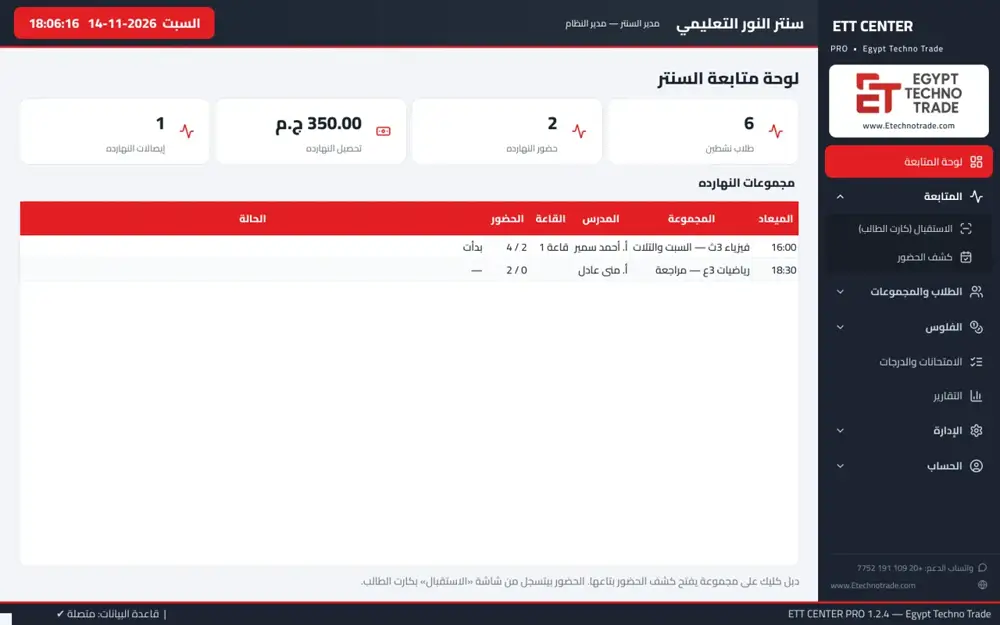
Screens are in Arabic.
What ETT Center Pro does
Students and cards
Random QR card codes, 10 cards per A4 page, and a replacement card that cancels the old one.
Groups
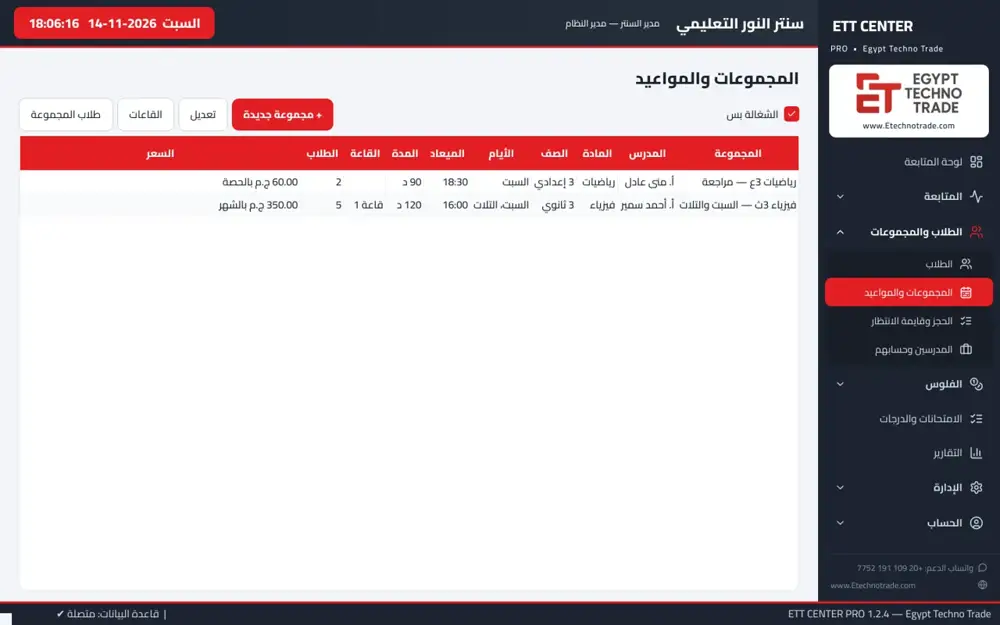
Teacher, subject, grade, room, days, time and maximum size, priced per month or per session, with booking and a waiting list.
Attendance at reception
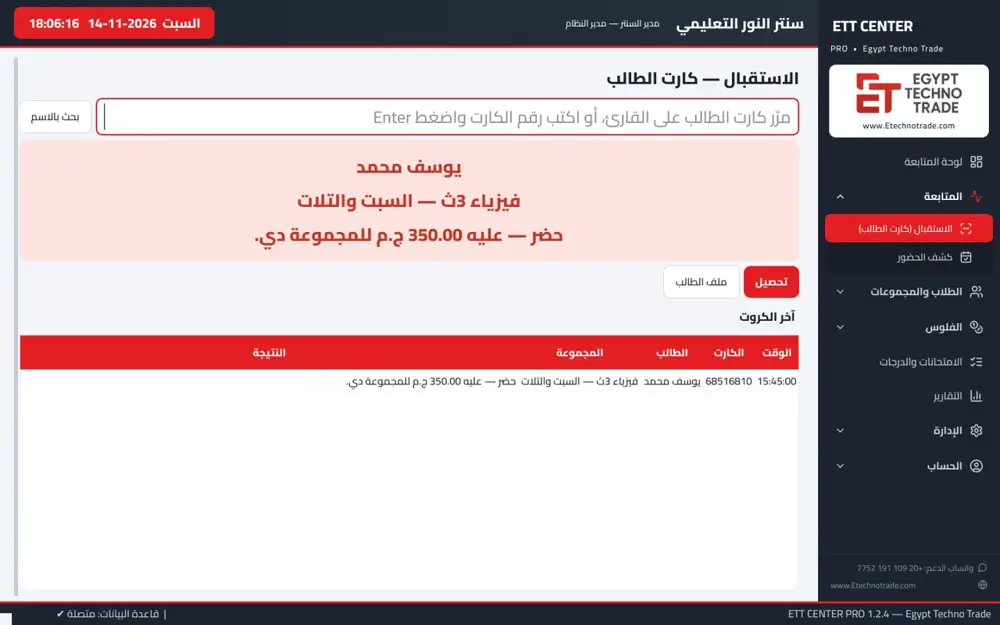
A USB reader records attendance for the group scheduled now: green means paid, red means fees due with a collect button.
Payments
Serial receipts that cannot be deleted or edited, cancellation with a reason and separate permission, arrears, and a cash box per employee.
Teacher accounts
A share of collections, an amount per attending student, or a fixed amount per session.
Parents on mobile
Parents see only their child: attendance, absence, amounts due and marks.
A day at a center running ETT Center Pro
Before the 4 pm class, students tap their cards at reception and the software records attendance for the 4 pm group automatically, because it is the group scheduled now. Paid students pass, and anyone who owes shows in red and pays with a serial receipt.
After class the employee sends absence messages to parents with one tap on WhatsApp. The owner, away from the center, sees today's collections and attendance in the app, and at month end the software calculates each teacher's account the agreed way.
Education center software: reception in a second
The hardest moment at any center is reception before a class: many students arrive at once, and each one must be checked in and checked for unpaid fees. In ETT Center Pro the student taps a card on a USB reader and attendance is recorded for the group scheduled now.
The screen turns green if the student has paid and red if fees are due, with a collect button so reception can take the payment on the spot.
Student cards
Each student gets a random QR card code, and the software prints 10 cards per A4 page. If a card is lost, the replacement card cancels the old one so nobody else can use it. Students are placed in groups, with a discount where applicable.
Group booking and schedules
Each group has a teacher, subject, grade, room, days, time and maximum size, priced per month or per session. When a group is full there is booking and a waiting list.
Center accounting and payments
- Serial receipts that cannot be deleted or edited.
- Cancellation with a reason and a separate permission.
- Arrears tracking.
- A cash box per employee.
Teacher share calculation
The software calculates each teacher's account the agreed way: a share of collections, an amount per attending student, or a fixed amount per session.
Center exams
Exams are a licensed option: quizzes, weekly, monthly, mid-year and final exams, with grades, absence and the group average.
Parent app and WhatsApp
The parent app is a licensed option: it pairs with a one-time code and shows only the parent's child, with attendance, absence, amounts due and grades, and several children on the same phone.
Absence or arrears messages open ready on WhatsApp and the employee taps send. The owner app, also a licensed option, shows today's collections, attendance and arrears from anywhere.
Center reports
Attendance, absence, collections per group, teacher and day, receipts, arrears and results, exported to Excel, PDF or CSV.
Security, operation and licensing
- Users with roles: reception, cash box, teacher assistant and manager.
- Change log and backup.
- Runs on one computer, or a server with reception computers on the network.
- Devices: a USB barcode or QR reader and an A4 printer for cards and reports.
- Licensed by active students and computers.
Reception at rush hour
Before every class dozens of students arrive together. Instead of searching a list for each name, the student taps the card, the software finds the group from the schedule and records attendance. The colours tell reception in a second who has paid and who owes, and the payment is taken from the same screen.
Following up arrears
Every student with fees due appears in the arrears report, with a ready WhatsApp message to the parent from the same screen. Parents with the app see the amount due themselves, so staff do not need to call each one.
Why serial receipts matter
Serial receipts that cannot be deleted or edited mean every pound that enters the center leaves a trace. Cancellation needs a reason and a separate permission, and each employee has a cash box, so the owner knows how much each employee collected and why.
Reports you will use every day
At the end of the day: attendance and absence per group, collections per teacher and day, and receipts. At the end of the month: arrears, results and teacher accounts. Every report exports to Excel, PDF or CSV.
One program instead of notebooks and Excel
Many centers start with a notebook for attendance and an Excel file for money. The problem is that attendance and payments live in two places, and it is hard to know who attended without paying or what each teacher is owed. In ETT Center Pro attendance, payments and teacher accounts come from the same data, receipts are protected, reports are ready at any time, and parents follow from their phone.
Why ETT Center Pro
- Attendance and payment at the same moment at reception.
- Serial, protected receipts and a cash box per employee, so no money goes missing.
- Each teacher's account is calculated automatically the agreed way.
- Parents follow their child on the phone, and absence and arrears messages are ready on WhatsApp.
- Runs on one computer and grows to a server with reception computers.
- Reports per group, teacher and day, exported to Excel and PDF.
Who uses education center software
- Reception: card attendance, payments and placing students in groups.
- Cash box: receipts, arrears and their own cash box.
- Teacher assistants: exams and grades.
- The owner or manager: reports, teacher accounts and mobile follow-up.
- Parents: their child's attendance, grades and amounts due.
From registration to the monthly account
A new student registers and receives a QR card, then joins a group priced per month or per session; if the group is full the student goes on the waiting list. At every class attendance is recorded at reception and payments are taken with a receipt.
Arrears collect in their own report with a ready WhatsApp message to the parent. In exams, grades and absence are recorded and the group average is calculated. At month end the software produces each teacher's account and collection reports per group, teacher and day.
How to order ETT Center Pro
- Send us the number of students, groups and reception computers.
- Tell us whether you need exams and the parent app.
- We send a quotation based on the license.
Inside the software
Supported devices
| Device | Role with the software |
|---|---|
| USB barcode or QR reader | Attendance at reception |
| A4 printer | Printing cards and reports |
Core software and licensed options
| Included in the core software | Licensed option |
|---|---|
| Students and cards | Exams |
| Groups, booking and waiting list | Parent app |
| Attendance at reception | Owner app |
| Payments, receipts and cash boxes | |
| Teacher accounts | |
| WhatsApp messages | |
| Reports |
Terms you will see in the software
- Group scheduled nowThe software knows from the group schedule which group the student is attending at this time, so reception does not pick it by hand.
- Waiting listWhen a group reaches its maximum size, new students go on a waiting list.
- Cash box per employeeEach employee has a separate cash box, so you know who collected what.
Who it is for
- Tutoring centers
- Language academies
- Training centers
Frequently asked questions
What does ETT Center Pro do?
It runs an education center: students, groups, card attendance, payments, exams and teacher accounts.
How is attendance recorded?
The student taps a QR card on a reader at reception, and attendance is recorded for the group scheduled now, showing if fees are due.
Does it calculate teacher shares?
Yes: a share of collections, an amount per attending student, or a fixed amount per session.
How much does ETT Center Pro cost?
Pricing follows the number of active students and computers, with exams and apps as licensed options.
Can it run on one computer?
Yes, on one computer, or a server with reception computers on the network.
Does it need expensive devices?
The devices are a USB barcode or QR reader and an A4 printer for cards and reports.
Can a receipt be edited?
No. Receipts are serial and cannot be deleted or edited; cancellation needs a reason and a separate permission.
What does the parent see?
Only their child: attendance, absence, amounts due and grades, with several children on one phone.
Can groups be priced per session?
Yes, per month or per session.
Does it calculate teacher shares?
Yes: a share of collections, an amount per attending student, or a fixed amount per session.
Does it keep a backup?
Yes, with a change log.