ETT Parking Pro
Parking management software
A complete parking system: tickets, payment, shifts and reports, with gate control, plus ticket dispensers and readers that run entries and exits without staff, on ZKTeco panels and Hikvision devices.

What ETT Parking Pro does
Push-button ticket dispenser
The driver presses the button, the ticket prints and the barrier opens.
Exit without staff
A QR reader at the exit reads the ticket and opens only if it is paid and within the grace time.
Central or gate payment
A central cashier with exit grace time; late drivers pay only the extra time.
Flexible tariffs
Per minute or hour, time bands, daily rate and cap, grace period, and rules for nights, holidays and vehicle type.
Subscriptions and invitations
Subscribers enter by card or QR with anti-passback, and visitor QR invitations enter and leave free.
Cash control
No double charging, waivers and discounts need supervisor approval, shifts with cash custody, and an audit log.
A day at a car park running ETT Parking Pro
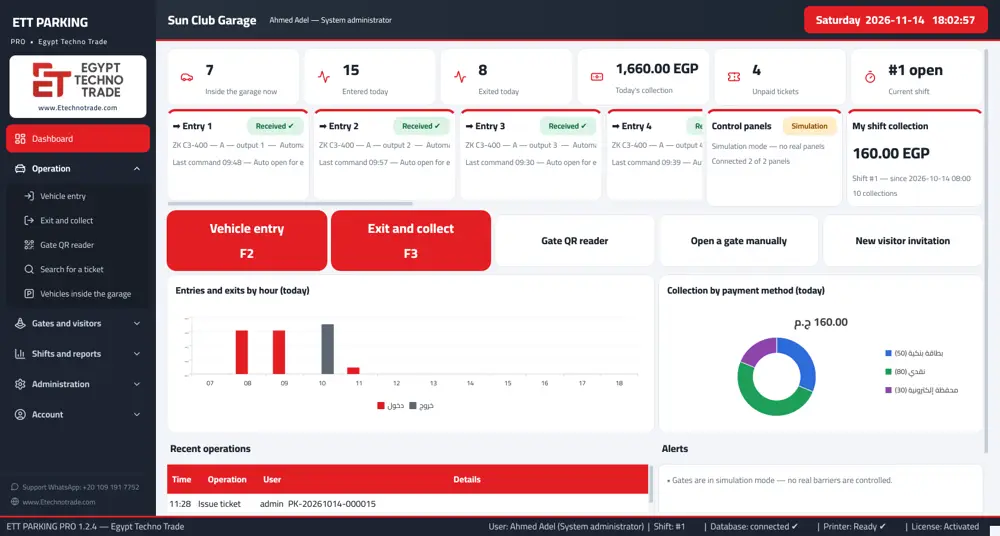
In the morning the cashier opens a shift with cash custody. Cars enter: either the entry clerk issues the ticket or the driver presses the dispenser button. The control panel shows how many cars are inside, how many entered and left, and today's revenue.
At the exit the driver pays at the cashier or at central payment and the barrier opens. A driver who exceeds the exit grace time after paying pays only the extra time. At the end of the shift the cashier closes it and the software compares actual cash with custody and shows the difference, which the manager can follow from the mobile app.
Parking management software from entry to exit
A car enters, a ticket prints with a random numeric code and a QR, and the barrier opens. At the exit the cashier or a QR reader reads the ticket, the software calculates the fee using the tariff that applied at entry, and the barrier opens after payment.
The tariff is saved with the ticket, so if you change prices, open tickets keep their original price. Lost tickets follow a policy set by management.
Parking tariffs by the hour, the minute or in bands
- Per minute or per hour, or time bands.
- Daily rate, daily cap and grace period.
- Special rules for night rates, vehicle type, weekends and public holidays.
Parking cashier software with cash control
- Double charging is prevented at the database level.
- Waivers, discounts, reprints and cancellations need supervisor approval.
- Shifts carry cash custody, actual cash and the difference, with corrections by approval.
- A hash-chained audit log reveals any direct change.
- Amounts are stored in piastres as whole numbers, so there are no rounding differences.
Parking ticket dispenser and staff-free exit
The ticket dispenser is a licensed option: a push button on the panel input and a receipt printer. The software checks the printer (paper and connection) before issuing, cancels the ticket automatically if printing fails, and blocks repeated presses with an adjustable wait.
For staff-free exits, a QR reader at the gate reads the random code on the ticket. If it is paid and within the exit grace time the barrier opens; otherwise it refuses and logs the attempt. Every dispenser and reader has an event log and an alert on the main screen.
Gate control
- No barrier opens when the software starts.
- Every command result is logged: received by the panel, failed or unconfirmed, with no automatic resend.
- Manual opening needs a reason and approval, and retries need a permission.
- Each panel is independent, so a stopped panel does not delay the others.
- Works with ZKTeco C3, C3 Pro and inBio panels and with Hikvision access control devices and panels.
Subscriptions, invitations and e-payment
Subscribers enter by card or QR with anti-passback, and visitor QR invitations enter and leave free of charge.
Electronic payment is a licensed option: InstaPay or a mobile wallet at the cashier, or the Paymob gateway with automatic confirmation. Plate cameras are also an option: a Hikvision or Dahua ANPR camera, or a regular IP camera with ETT Vision AI reading Egyptian plates.
32 operational and financial reports
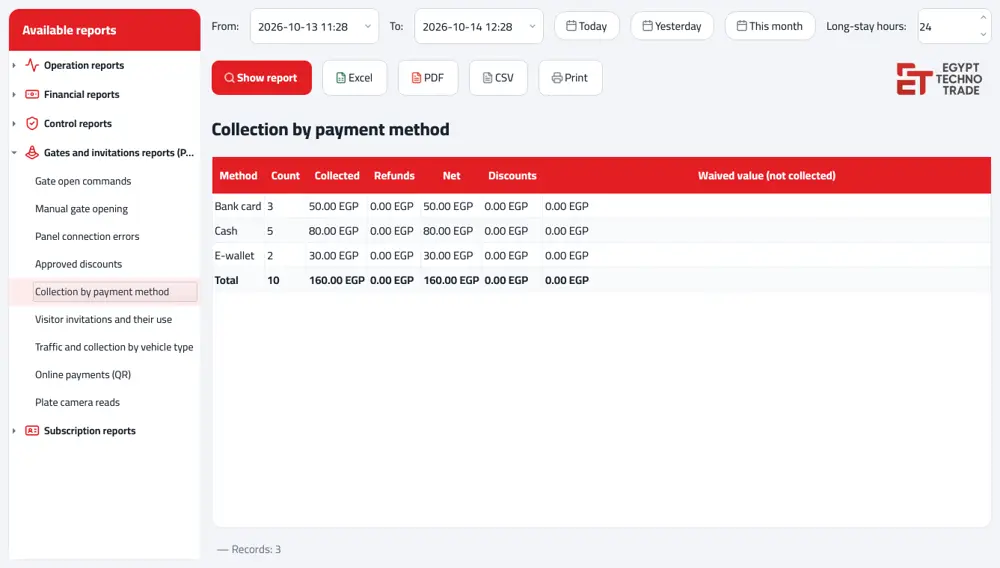
Operation, financial and control reports, plus gate commands, manual gate opening, panel connection errors, approved discounts, collection by payment method, visitor invitations and their use, traffic and collection by vehicle type, online payments, plate camera reads and subscription reports. Everything exports to Excel, PDF or CSV, or prints.
The software runs in English or Arabic per computer, and tickets print in English, Arabic or both.
Roles, licensing and specifications
- Roles: entry clerk, cashier, supervisor, manager and read-only management.
- One license on the server sets the number of entries, exits and devices, or unlimited; options are added with a new license file, with no reinstall and no data loss.
- Windows 10 or 11 (64-bit), automatic backup with integrity checks, and optional SQL Server sync.
- Includes the ETT Panel Tester tool for testing panels and ticket printers on site.
- If the server stops, devices stop issuing and collecting to protect the data.
Why ETT Parking Pro
- It runs ZKTeco and Hikvision panels, so you can keep your existing gates.
- Cash is protected: no double charging, supervisor approval for waivers and cancellations, and a log that reveals any change.
- Start with staff at the gate, then add a ticket dispenser and QR exit later with a new license file.
- 32 ready reports, plus an admin app to follow revenue from anywhere.
- Each panel is independent, so if one gate stops the rest keep working.
Who uses parking management software
- Paid car parks: hourly, per-minute or banded tariffs and cashier shifts with custody.
- Malls: many entries and exits, ticket dispensers and central payment with exit grace time.
- Hospitals: traffic all day, grace periods and night rates.
- Clubs and compounds: subscriptions by card or QR and free visitor invitations.
Fee calculation example
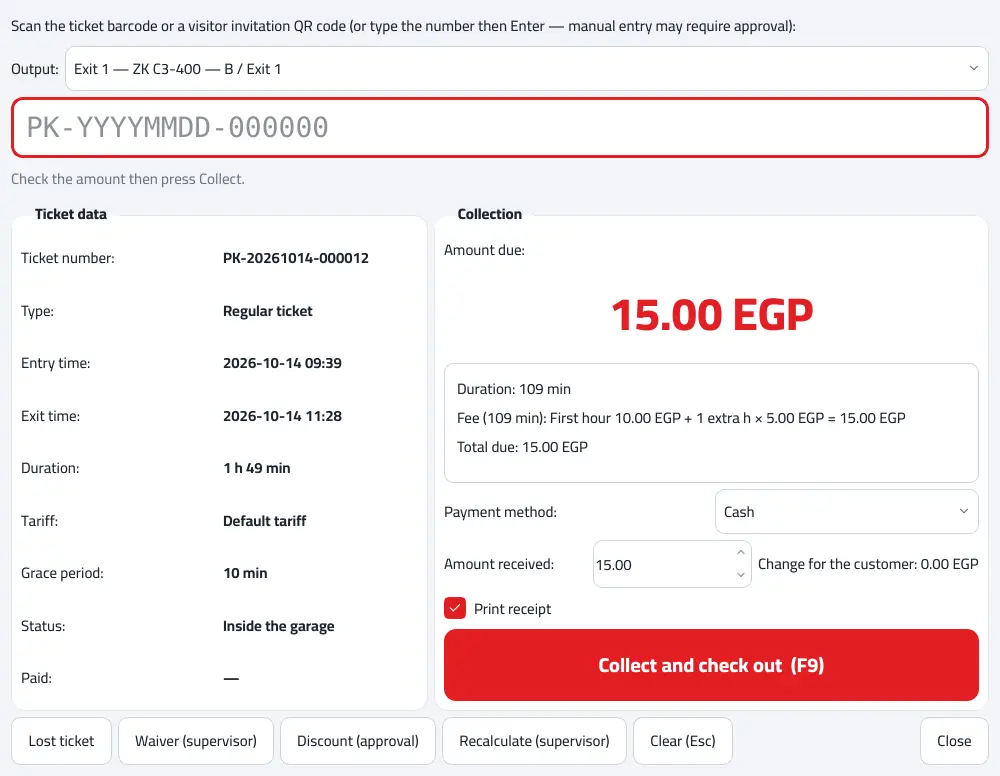
The exit screen shows the calculation in detail. In the demo, for example, the first hour is EGP 10 and each extra hour is EGP 5, along with the duration, the grace period and the tariff applied. The payment method is chosen as cash, card or wallet, and the receipt prints.
Subscriptions and lost tickets
Subscribers enter and leave by card or QR, and anti-passback stops the same card from letting two cars in one after the other. Lost tickets follow a policy set by management, so the cashier does not decide alone. Waivers, discounts and reprints all need supervisor approval and appear in the approved discounts report.
Devices and network
Each device pairs with the server using a one-time code valid for 10 minutes, and any device can be stopped immediately. The connection is encrypted and the server identity is pinned on every device. The software installs fully offline.
How to order ETT Parking Pro
- Send us the number of entries and exits and whether gates are already installed.
- Tell us whether you want staff at the gate or a ticket dispenser with QR exit.
- Add the options you need: e-payment, plate cameras or the admin app.
- We send a quotation based on the license.
Inside the software
Mobile apps
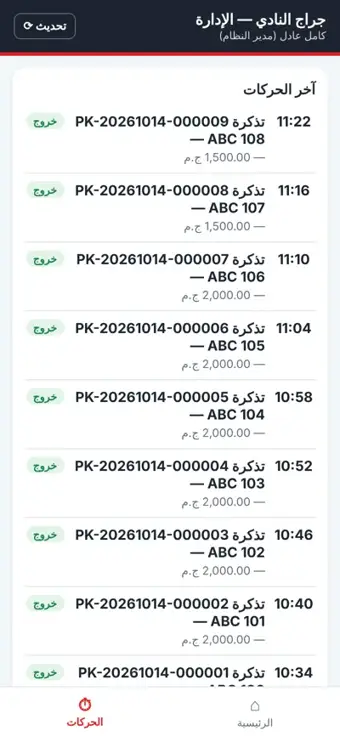
Management app: today's revenue, cars inside, unpaid tickets, gate status and recent events.
App screens are in Arabic.
Licensed option
Supported devices
| Device | Role with the software |
|---|---|
| ZKTeco C3, C3 Pro and inBio panels | Open entry and exit barriers and run ticket dispensers and readers |
| Hikvision access control devices and panels | Gate opening |
| Barriers and garage gates | The barrier opens on a command from the software |
| Thermal ticket printer and QR reader | Print the ticket and read it at the exit |
Related: Parking barrier gates.
Core software and licensed options
| Included in the core software | Licensed option |
|---|---|
| Ticket issue and printing | Push-button ticket dispenser |
| Tariffs | QR exit without staff |
| Cashier, collection and shifts | Central payment |
| Lost tickets, waivers and discounts | E-payment (InstaPay, wallets, Paymob) |
| Gate opening from the cashier | Plate camera |
| Reports, users and permissions | Admin mobile app |
| Backup, server and clients |
Terms you will see in the software
- Exit grace timeThe time allowed after payment to reach the gate and leave without an extra fee.
- Shift custodyThe amount the cashier is responsible for during the shift; the software calculates the difference from actual cash.
- Lost ticketA ticket the driver has lost, charged by a policy set by management.
Who it is for
- Paid car parks
- Malls
- Hospitals
- Clubs and compounds
Frequently asked questions
What does ETT Parking Pro do?
It issues parking tickets, calculates and collects fees, manages shifts, opens gates and produces over 30 reports.
Can the car park run without staff at the gate?
Yes, with a push-button ticket dispenser at the entry and a QR reader at the exit with central payment, as licensed options.
Which panels does it work with?
ZKTeco C3, C3 Pro and inBio panels, and Hikvision access control devices and panels.
How much does ETT Parking Pro cost?
Pricing follows the license: entries, exits and devices, plus options such as the ticket dispenser, QR exit and e-payment.
If I change prices, how are open tickets charged?
At the price in force when they entered, because the tariff is saved with the ticket.
Can I add an option after installation?
Yes, with a new license file and no reinstall or data loss.
Does it print tickets in English?
Yes, English, Arabic or both.
What happens if the server stops?
Devices stop issuing and collecting to protect the data until the server is back.