ETT Time Pro
Time attendance and payroll software
One server reads every ZKTeco and Hikvision attendance device in every branch and produces one attendance sheet and one consolidated report for the whole company: shifts, leaves, lateness, overtime and payroll.

What ETT Time Pro does
All devices in one program
ZKTeco standalone and face devices, C3 and inBio panels, and Hikvision devices on the same sheet. Each employee is enrolled on their branch devices automatically.
Shifts and shift merging
Fixed, overnight, split, flexible by hours, and rotations such as 4 on / 2 off, with automatic matching to the nearest shift.
Leaves and permissions
Annual, casual, sick, unpaid, mission and half-day leave with yearly balances, plus late-arrival and early-leave permissions.
Deductions and overtime by policy
Tiers for lateness, early leave, absence and missing punches, and overtime rates for workdays, rest days and holidays.
Payroll from attendance
Monthly, daily or hourly pay, allowances, deductions, bonuses, penalties, loans in installments and a payslip per employee.
Mobile check-in for missions
Employees check in from their phone at the mission location only, on mission days only.
A working day with the attendance software
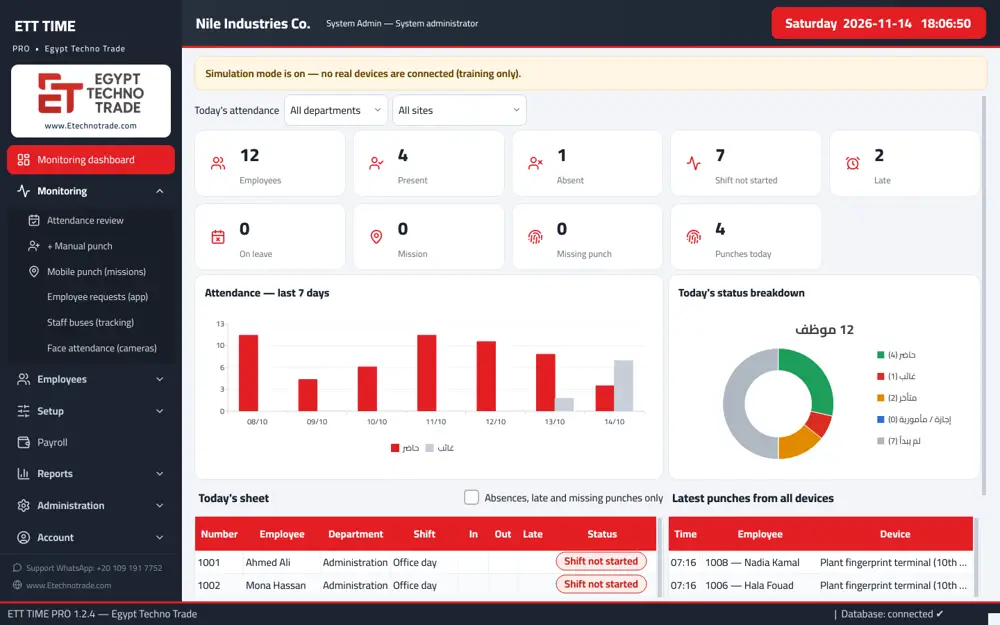
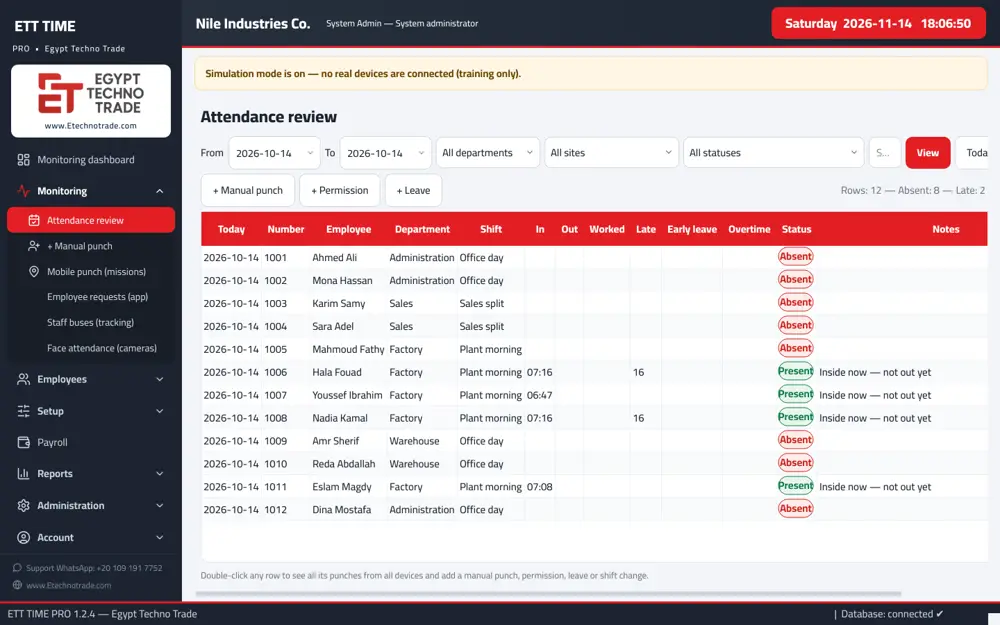
In the morning employees punch at their branch devices, and the punches reach the server as they happen. The HR officer opens the live dashboard and sees who is present, absent, late, on leave or missing a punch, without collecting files from branches.
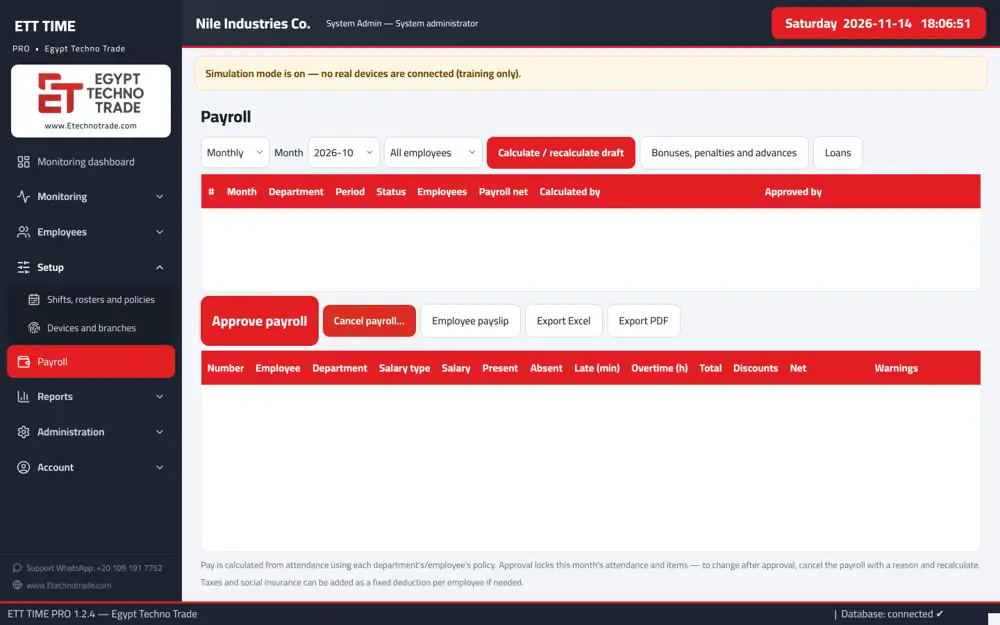
If someone forgot to punch, the officer adds a manual punch with a reason, recorded under their name. At month end the payroll accountant produces the payroll sheet as a draft from the same attendance, and the HR manager approves it to lock the month.
Fingerprint attendance software that reads all your devices
Most companies start with the free program that ships with the attendance device. It works for one device in one place. Once devices sit in several branches, or come from different brands, data ends up scattered and the monthly sheet is rebuilt by hand in Excel.
ETT Time Pro is time attendance software that runs as one central server. Every device sends every punch to the server, and keeps it if the network is down until the link returns. For every employee and every day the software computes check-in, check-out, worked hours, lateness, early leave, overtime, absence and missing punches.
HR and payroll computers work as clients on the same server, so each team sees its own work without passing files around.
ZKTeco attendance software that pulls punches from every model
If you are looking for ZKTeco attendance software or a way to pull fingerprints from ZKTeco devices, ETT Time Pro reads all of these on one attendance sheet:
- ZKTeco standalone and Visible Light face terminals, with remote fingerprint and face enrolment.
- ZKTeco ADMS devices such as Horus, SpeedFace and MiniAC Plus, which connect to the server themselves with no static IP or VPN.
- ZKTeco C3, C3 Pro and inBio panels, with inBio fingerprints pulled automatically.
- Hikvision attendance and access control devices, with face from a photo.
- Devices without a network: punches and users are imported from a USB flash drive without duplicates, including StandardReport.xls files such as those from the LX50.
Enrol once, use on every device
Like BioTime, fingerprints and faces are enrolled once on any device and sent to the company's other devices of the same type. Users enrolled directly on a device appear in an "import them?" alert and are added with the same number. Fingerprint templates do not transfer between different brands, and the connection to each site device is tested and approved during installation and handover.
Payroll software built on attendance
Payroll is a licensed option, designed so that pay comes from the same attendance data with no re-entry:
- Day value = salary ÷ divisor (default 30); hour value = day value ÷ hours per day.
- Monthly, daily or hourly pay, with a configurable payroll month start such as the 26th to the 25th.
- Fixed allowances and deductions, bonuses and penalties, and advances and loans in installments.
- Taxes and social insurance can be added as a fixed deduction when needed.
- The payroll sheet starts as a draft; approval locks the month, and every employee gets a printable payslip.
Shift scheduling for factories and offices
Each shift can have up to 3 periods, with late and early grace, a break and a punch acceptance window. Weekly and rotating rosters run up to 56 days, per department, per employee or for everyone, with start and end dates.
Changing one day's shift for an employee, as a swap or a compensatory rest, is recorded with a reason, and public holidays are handled. Shift merging picks the shift closest to the punch automatically, which matters in plants with night shifts across midnight or rotations such as 4 days on and 2 off.
Leave, permissions and deduction policies
Leave types include annual, casual, sick, unpaid, mission and half day, with yearly balances, plus late-arrival and early-leave permissions with monthly limits.
Deductions follow policy tiers for lateness and early leave, in minutes, as a fraction of a day or as an amount, plus absence and missing punches. Overtime uses different factors for work days, rest days and holidays. Each department can have its own policy, reports and payroll sheet, and an HR officer can be limited to specific departments.
Employee attendance app and admin app
Both apps are licensed options:
- Employee app: request leave, a permission or a mission from the phone; approval by the department manager and then HR returns to the phone and is posted to attendance. Employees see their attendance, balances and HR messages, and managers get a "My team" tab.
- Mobile punch: employees punch from outside only on missions, only at set places, or anywhere with the location recorded.
- Admin app: today's attendance (present, late, absent), live punches, any employee's month, and approval or rejection of requests.
- Each phone pairs once with a QR code and keeps the user's program permissions; a lost phone is revoked from the program.
Attendance for branches without a VPN
Branches connect in two ways as a licensed option: an ADMS device connects to the server itself, or a branch agent runs on a computer at the branch.
For customers without a static IP, the optional ETT cloud gateway lets the server open an encrypted outbound link, so phones and branch terminals connect without complex setup. The gateway stores no data; everything stays on the customer's server. A "Sync requests" screen shows what is pending or failed for each device and why.
25 attendance and payroll reports
- Detailed sheet, monthly day grid and summary per employee.
- Lateness, early leave, absence, missing punches, overtime and rest-day work.
- All punches, punches by device and branch, manual changes and device status.
- Leave, balances, permissions, shift distribution, summary by department and branch, and the consolidated report.
- Payroll sheet by department with item details, bonuses, penalties and loans, exported to Excel, PDF or CSV.
Roles and security
Roles cover the HR officer, payroll accountant, HR manager, system administrator and read-only management, and only the HR manager approves payroll.
Every manual change, such as a forgotten punch, excluding a wrong punch, changing a shift, a permission or a leave, is recorded with a reason and the name of the person who made it, and nothing is deleted after approval. The audit log is hash-chained and device passwords are encrypted.
Specifications and licensing
- Windows 10 or 11 (64-bit).
- Database on the server, with optional one-way sync to the customer's SQL Server.
- English or Arabic per computer, fully offline installation and automatic backup.
- A digitally signed license by number of attendance devices, computers and employees; payroll, apps, branches, mobile punch and Vision AI are licensed options.
How to order ETT Time Pro
- Send us the number of branches, your attendance devices and their brands, and the number of employees.
- Tell us which options you need: payroll, apps, mobile punch or branches.
- We send a quotation based on the license.
- During installation we test and approve the connection to every device on site before handover.
Inside the software
Mobile apps
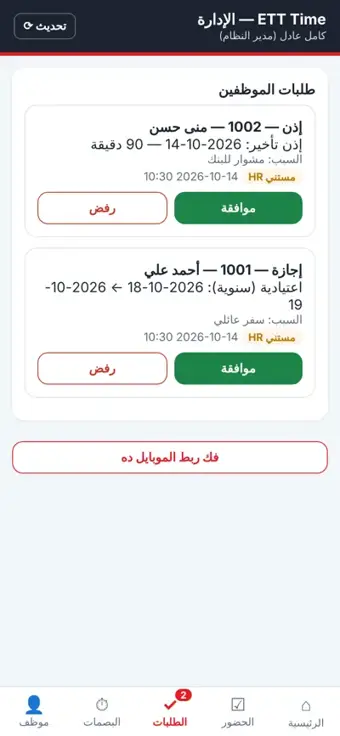
Employee and manager apps: leave, permission and mission requests with manager and HR approval, and today's attendance on the phone.
App screens are in Arabic.
Licensed option
Supported devices
| Device | Role with the software |
|---|---|
| ZKTeco standalone and Visible Light face terminals | Employee, card and fingerprints, with remote fingerprint and face enrolment |
| ZKTeco ADMS devices (Horus, SpeedFace, MiniAC Plus) | The device connects to the server itself, with no static IP or VPN; face templates are shared between devices |
| ZKTeco C3, C3 Pro and inBio panels | Employee and cards, plus inBio fingerprints |
| Hikvision attendance and access control devices | Employee, cards, fingerprints and face from a photo |
Terms you will see in the software
- Shift mergingThe software picks the shift closest to the punch time automatically instead of fixing one shift per day.
- Missing punchA day with a check-in and no check-out, or the reverse, listed in its own report.
Who it is for
- Companies with branches
- Factories with night shifts and rotations
- Departments with separate reports
- Staff on field missions
Frequently asked questions
What does ETT Time Pro do?
It collects punches from all attendance devices in all branches on one server and calculates attendance, lateness, overtime and absence for each employee every day, and payroll from them.
Does it work with ZKTeco and Hikvision together?
Yes. ZKTeco standalone and face devices, C3 and inBio panels and Hikvision devices appear on the same attendance sheet.
Does it calculate payroll?
Yes, as a licensed option: payroll from attendance with allowances, deductions and loans, and a payslip for each employee.
How much does ETT Time Pro cost?
Pricing follows the license: the number of attendance devices, computers and employees, plus the options you need. Send us your details for a quotation.
Does it work without the internet?
Yes. It installs fully offline at the customer site, and devices connect over the company network.
Can it import from devices with no network?
Yes, punches and users are imported from a USB flash drive without duplicates.